
티스토리 뷰
2주차에는 동작을 쉽게 사용할 수 있는 Jquery에 대해 배우게된다.
jQuery 란
HTML의 요소들을 조작하는, 편리한 Javascript를 미리 작성해둔 것. 라이브러리라고 한다.
그래서 jQuery를 사용하기 위해서는 아래 스크립트를 작성해주면 된다.
<script src="https://ajax.googleapis.com/ajax/libs/jquery/3.5.1/jquery.min.js"></script>
jQury에서는 상태값을 가져오기위해 val() 이라는걸 사용하면 되는데
    <div class="form-floating mb-3">
        <input type="email" class="form-control" id="Url" placeholder="name@example.com">
        <label for="Url">영화URL</label>
    </div>
이런식으로 html 코드가 되어있다면 그 아이디값을 지정해 val()을 아래와같이 써주면 된다.
$('#url').val();라이브러리는 모두 외워서 사용 할 필요없고 필요한 부분을 찾아서 사용하면된다.
jQuery API Documentation
jQuery is a fast, small, and feature-rich JavaScript library. It makes things like HTML document traversal and manipulation, event handling, animation, and Ajax much simpler with an easy-to-use API that works across a multitude of browsers. If you're new t
api.jquery.com
그 다음으로는 Ajax를 배우게되는데
기본골격으로는 아래와같다.
$.ajax({
        type: "GET",
        url: "여기에URL을입력",
        data: {},
        success: function(response){
        console.log(response)
    }
})
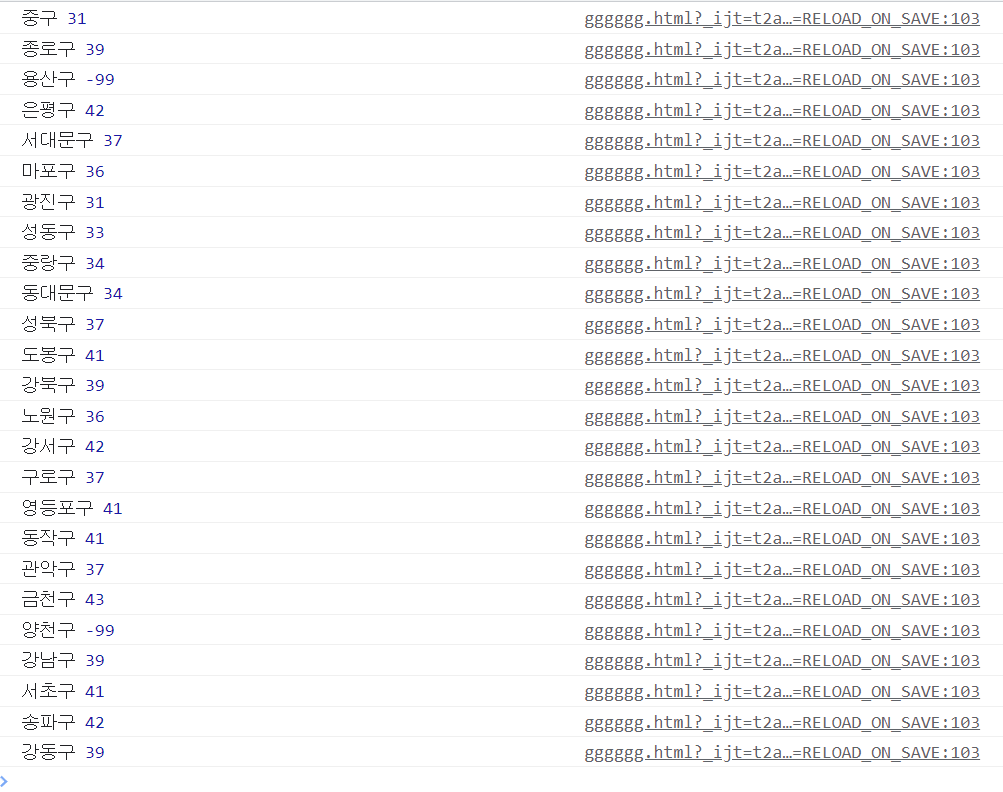
ajax를 사용해서 서울시 미세먼지 OpenAPI를 사용해봤다.
    <script>
        $.ajax({
                type: "GET",
                url: "http://spartacodingclub.shop/sparta_api/seoulair",
                data: {},
                success: function(response){
                let rows = response['RealtimeCityAir']['row'];
                for(let i = 0; i < rows.length; i++){
                    let gu_name = rows[i]['MSRSTE_NM'];
                    let gu_mise = rows[i]['IDEX_MVL'];
                    console.log(gu_name, gu_mise);
                }
            }
        })
    </script>
결과는 아래와 같이 지정한 구의 이름, 미세먼지가 나오게 됐다!
'개발 > 항해99' 카테고리의 다른 글
| Git 시작하기 가이드. (0) | 2022.09.07 |
|---|---|
| 항해99 (웹개발 종합반 5주차) (0) | 2022.09.05 |
| 항해99 (웹개발 종합반 4주차) (0) | 2022.09.04 |
| 항해99 (웹개발 종합반 3주차) (0) | 2022.09.04 |
| 항해99 시작 (웹개발 종합반 1주차) (0) | 2022.09.02 |
공지사항
최근에 올라온 글
최근에 달린 댓글
- Total
- Today
- Yesterday
링크
TAG
- POI
- IOC
- backoffice
- method
- EntitiyManagerFactory
- JPQL
- this
- DTO
- 코드해석
- 협업
- 알고리즘
- java
- DI
- joinfetch
- 김영한
- ajax
- .jks
- ssl
- Spring
- JPA
- JWT토큰
- instance
- wil
- 풀텍스트
- python
- EC2
- querydsl
- 환경세팅
- badrequest
- 항해99
| 일 | 월 | 화 | 수 | 목 | 금 | 토 |
|---|---|---|---|---|---|---|
| 1 | 2 | 3 | 4 | 5 | 6 | |
| 7 | 8 | 9 | 10 | 11 | 12 | 13 |
| 14 | 15 | 16 | 17 | 18 | 19 | 20 |
| 21 | 22 | 23 | 24 | 25 | 26 | 27 |
| 28 | 29 | 30 |
글 보관함